


What's new in Lens Desktop 2026.6: Integrated with familiar AI Tools and Flux
TL;DR:
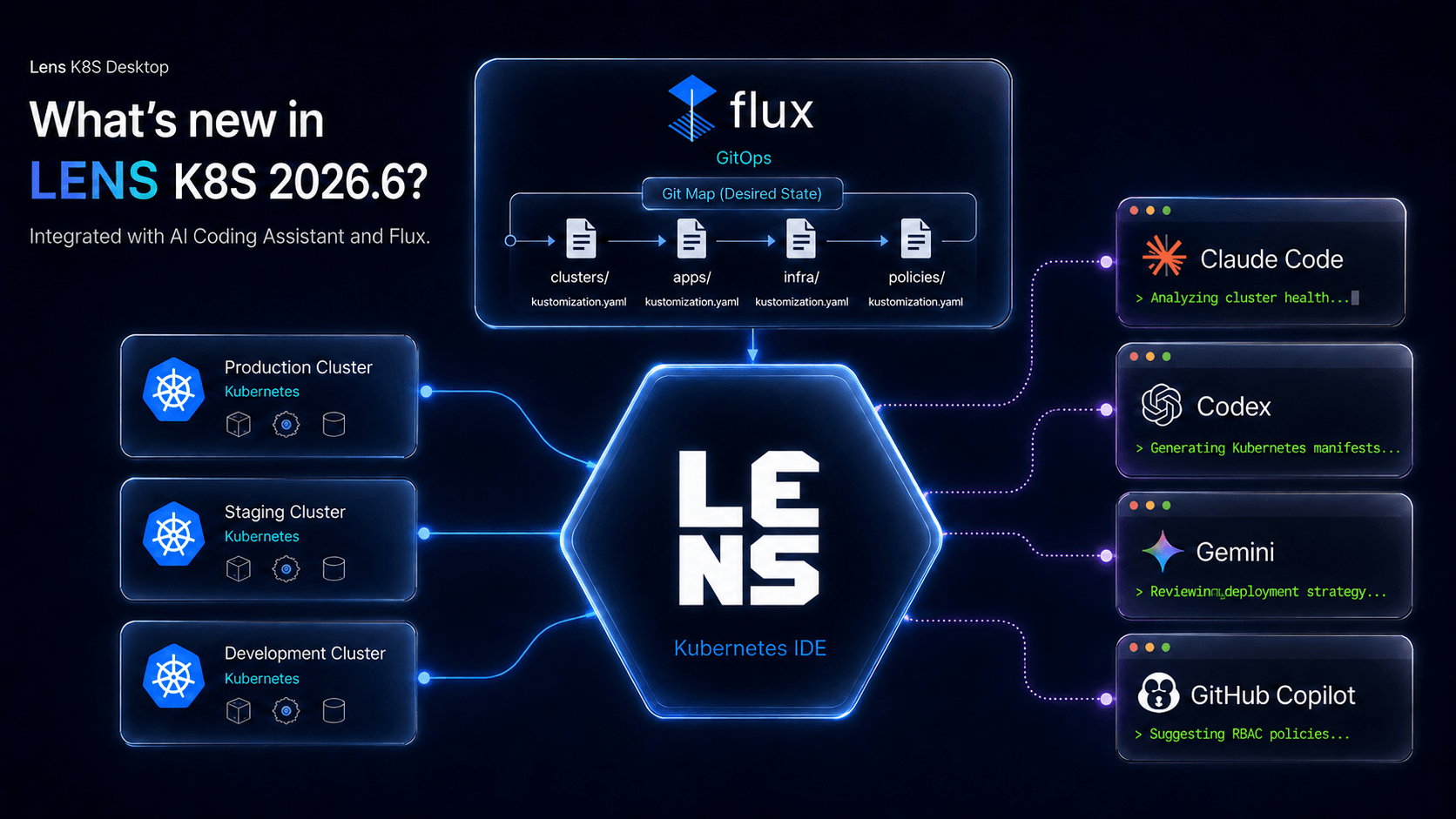
- Lens Prism has evolved: You can run the AI agent you already use, Claude Code, Codex, GitHub Copilot CLI, or Gemini CLI, right inside Lens, without needing to bring your own API key
- A new dedicated section is available for Flux, showing you exactly what is synced, what’s failing, or what is even drifting
- Quality of life fixes: OCI Helm registry support fix, more reliable AKS Azure SSO login, safer kubeconfig edits and more
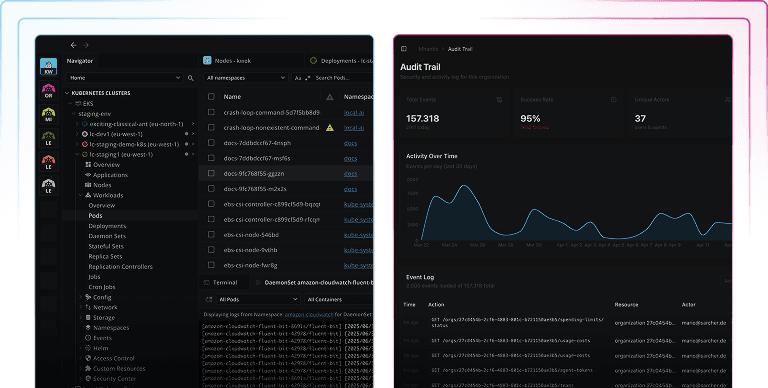
Two of the most common Kubernetes friction points get easier in the latest release of Lens Desktop (2026.6): you can now use the same AI agents you already use directly in Lens Kubernetes IDE without needing to bring your own API key, and Flux gets a dedicated view for better understanding your GitOps workflows.
AI Coding Agents are becoming the default way developers build software, according to the Stack Overflow Developer Survey 2026.
Bring Your Own AI Agent into Lens Kubernetes IDE
Lens Desktop 2026.6 brings the agentic workflow to Kubernetes. Your AI agent runs inside Lens, connected to your cluster: it reads what is running, makes sense of the data, and helps you reach a conclusion right where you work. Instead of an assistant wired to one provider, you bring the AI agent you already trust inside Lens.
See it in action:
Auto-Integration and Setup
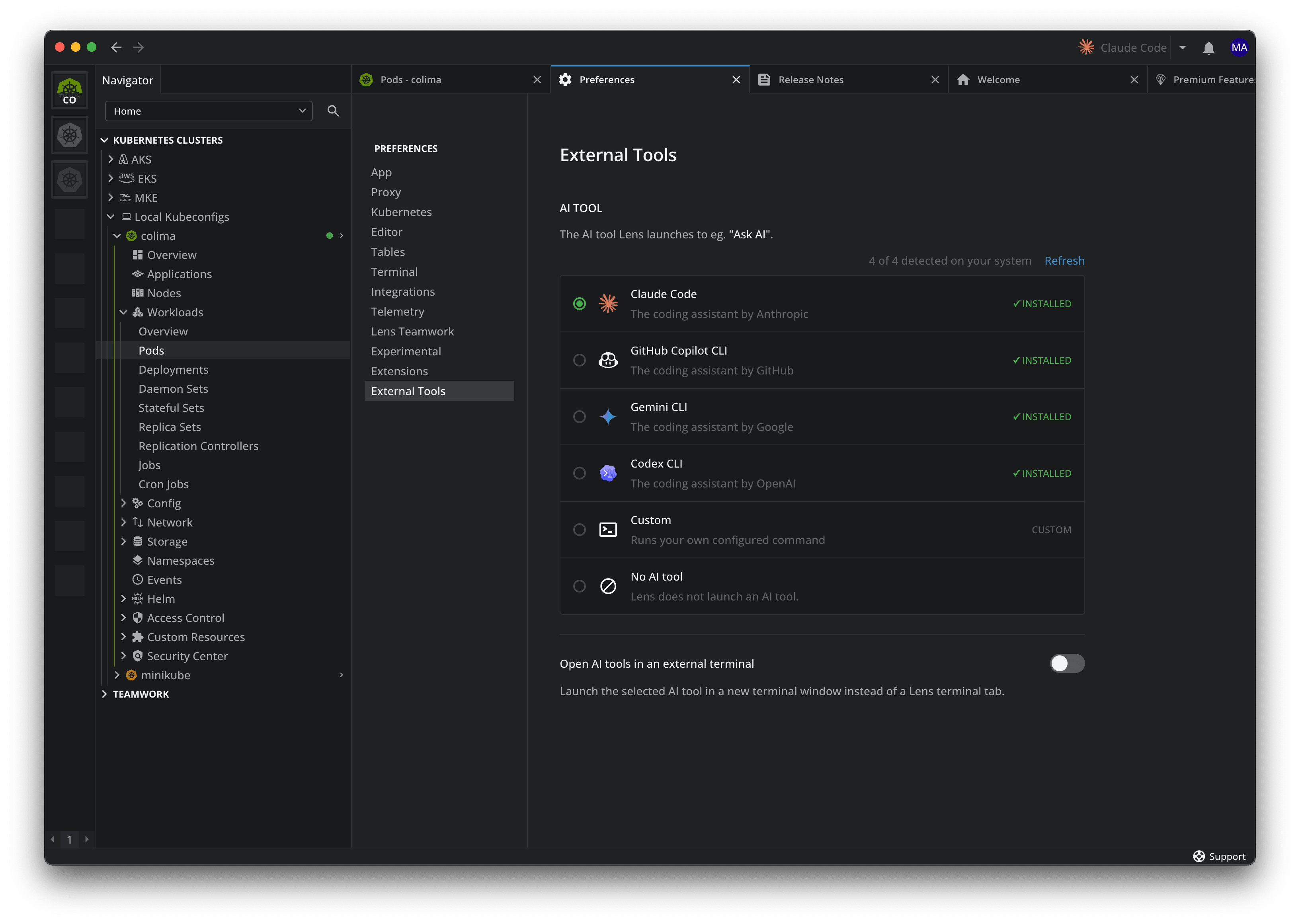
Lens auto-detects the AI agents installed on your machine and helps you set up the integration, treating each one as its own tool. You can set a default in External Tools preferences, or switch whenever you like.
Each agent brings its own intelligence and its own sign-in, so you are not configuring an AI provider or introducing an API key inside Lens. If the agent you use is not detected, add it with a custom command and run it the same way.
How it works
When you open a cluster, Lens opens a terminal with the same cluster context the normal Lens terminal already gives you (where KUBECONFIG already points at your active cluster and a matching kubectl is on the PATH). What’s new is that it also drops the agent's own context file (a CLAUDE.md or GEMINI.md) into the working directory, so the agent starts with the right notes instead of a blank slate.
You can reach the agent in a few ways:
- The top-bar button
- The Cmd/Ctrl + I shortcut
- Right-click actions on any resource
You can resume a previous session, or pop the agent into an external terminal for a full screen view. No more hopping to another terminal, re-pointing it at the cluster, or copy-pasting logs into a chat: the agent is already where your Kubernetes is, looking at the real thing.
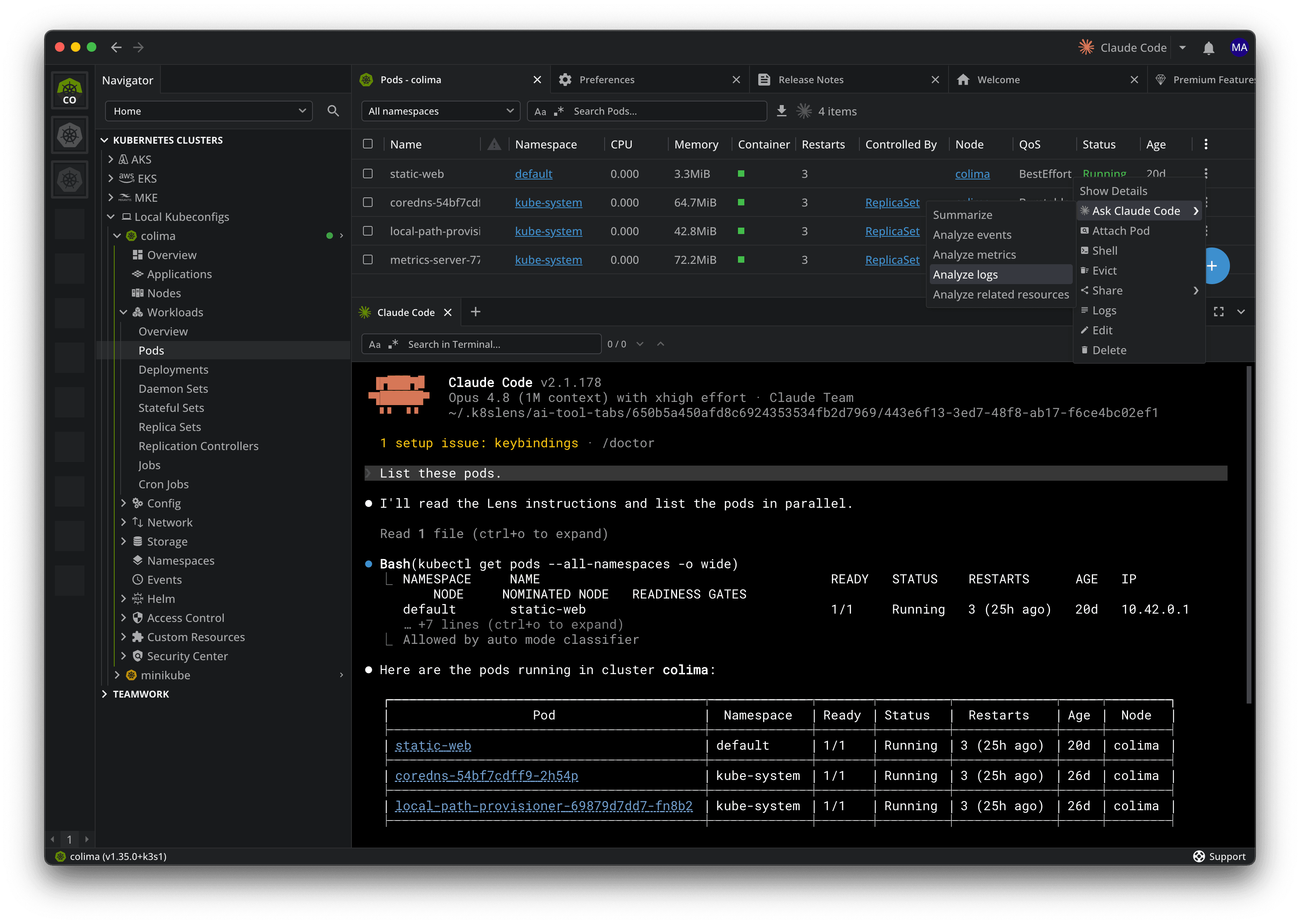
Right-click any resource and Lens gives you a menu of agent actions. The context-aware right click actions themselves aren’t new, as Prism has offered them for a while, but now they run through the agent you bring, instead of a built-in LLM. When you right-click a Pod, you can open Ask Claude Code (or whichever agent you set), and pick an action: summarize the resource, analyze its events, metrics, or logs, or look at related resources. Each one opens with the resource's context already loaded, so the agent starts from exactly what you are looking at, as it did before.
Note: Connecting Prism to your own LLM is deprecated in favor of using the AI agent integration.
Flux GitOps support in the navigator
If you run GitOps, you know the other half of the problem. Many incidents trace back to a recent change, and a GitOps controller applies changes all day. Checking what Flux did usually means a string of kubectl get and kubectl describe calls across several resource types.
A quick primer on Flux
Flux keeps a cluster in sync with Git: you declare the desired state in a repo, and Flux continuously reconciles the cluster to match. That work spans a set of custom resources: GitRepository and other sources, Kustomization, and HelmRelease, plus image automation and notifications. Tracking it by hand, across all of those resource types is exactly the kind of thing that is hard to see at a glance.
Flux in Lens Kubernetes IDE
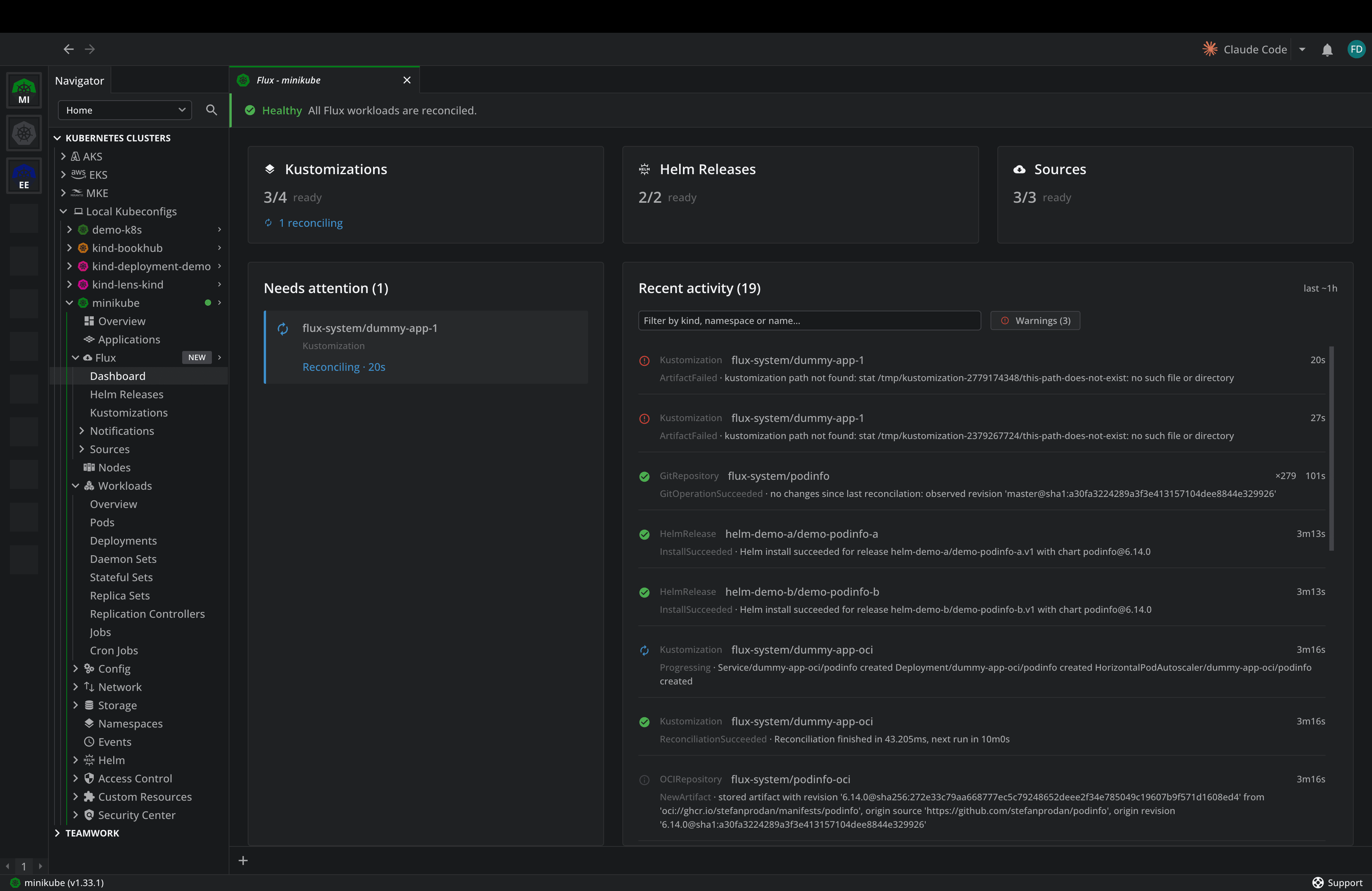
Lens Desktop 2026.6 brings built-in support for Flux, the CNCF-graduated GitOps project, into the navigator:
- A Flux navigator group and dashboard that pull together your sources, Kustomizations, HelmReleases, image automation, and notifications, each with its reconcile state.
- A health view that flags what is failing or drifting, so a broken Kustomization surfaces on its own.
- Detail panels per resource type, with the cross-references that connect a source to what it deploys.
- A Flux status column in workload lists, so you can see which workloads Flux manages and how they are reconciling.
- Ask AI about any Flux resource, with its context already loaded.
See it in action:
Say a Helm upgrade times out in production. Instead of grepping across namespaces, you open the Flux dashboard, find it under "needs attention" and jump to the failing HelmRelease.
Also in This Release
There are a couple of fixes available in this release as well:
- OCI Helm registries are now supported in the Helm UI
- Managing Helm releases deployed locally via the CLI no longer fails
- AKS Azure SSO login no longer fails when a previous session left an orphaned lock behind
- Creating a Teamspace with a name that is already taken now shows a clear message
- “Remove from kubeconfig” no longer silently rewrites single-file synced kubeconfigs.
Get the update
The Flux GitOps dashboard and AI agent integration are both available with a Lens Plus, Pro, or Enterprise subscription.
Lens Desktop 2026.6 is available now. Download it from lenshq.io, or update from inside the app.
For details on the plans, see lenshq.io/pricing.