
TL;DR:
- Argo CD is a GitOps tool that keeps your Kubernetes cluster in sync with your Git repository, solving drift, auditability, and access control issues
- To use Argo CD, there are four important concepts that you need to understand: applications, sync status, health status, and projects
- The app of apps pattern enables you to bootstrap multiple applications from a single root manifest, while ApplicationSets enable you to generate applications from a template
- Lens Kubernetes IDE now offers native Argo CD support, so you can easily see sync and health status and jump into managed workloads from a single place
Your Git repository says one thing, and your Kubernetes clusters say another, and there is no easy way to tell which one is right. Someone in your team scaled a deployment by hand last week, someone else hotfixed an image tag, and nobody can trust the Kubernetes manifests anymore.
Argo CD solves this by making Git the single source of truth for your cluster, and in this article we will:
- Walk through installing Argo CD
- Deploy real applications with the app of apps pattern
- Break an application on purpose
- And learn how we can scale the setup with ApplicationSets
Don't feel like reading? Watch the video instead:
What is Argo CD?
Argo CD is a controller that lives inside your Kubernetes cluster, and its only job is to watch Git repositories and make your cluster look exactly like them. Git becomes the source of truth, and the cluster becomes a reflection of it. If someone in your team makes a manual change, Argo CD picks that up and, depending on how you configure it, will put it back.
There are three big problems that Argo CD solves:
- Drift: Argo CD continuously compares what's running in your Kubernetes cluster with what is in Git and tells you the moment they diverge
- Auditability: Every change you make to your environment will be a commit, so who changed what, when, and why become questions you can easily answer
- Access: Your engineers don't need cluster credentials to deploy; they just need push access to a repository, which massively reduces the number of engineers in your team that hold production keys
What are the most important Argo CD concepts?
Before installing Argo CD, let's take a look at the four ideas that make it click:
- Application: This is a custom Kubernetes resource that says: take this repository, with this folder, at this revision, and then deploy it into this cluster inside this namespace. You should consider the application the unit of everything in Argo CD
- Sync status: Argo CD constantly diffs Git against your Kubernetes cluster. If it matches, the application is
Synced; otherwise, it isOutOfSync. Syncing is the act of applying the Git state to your Kubernetes cluster - Health status: Your Argo CD application can be perfectly in sync, but it can be unhealthy. Sync answers the question "does the cluster match Git?", while health answers "does this thing actually work?"
- Projects: An
AppProjectis a boundary that controls which repositories applications can pull from, which clusters and namespaces they can deploy to, and what resources you can create. On a shared cluster, this is exactly what stops team A from deploying into team B's namespace
How to install Argo CD?
For this example, I will use a minikube cluster in Lens Kubernetes IDE, but you can use any kind of Kubernetes cluster and plain kubectl. Argo CD installs like any other application: you create a namespace, and apply the official manifests:
kubectl create namespace argocd

kubectl apply -n argocd -f https://raw.githubusercontent.com/argoproj/argo-cd/stable/manifests/install.yaml
In less than a couple of minutes, you will see that Argo CD has been installed successfully, and all of your pods are running.
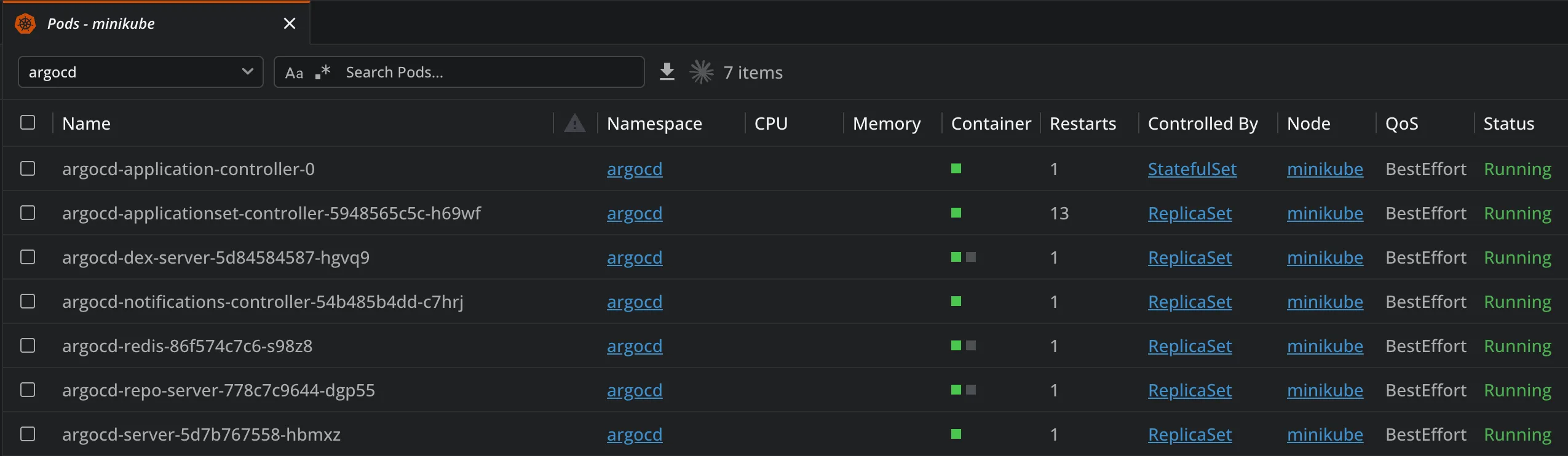
If you are using Lens Kubernetes IDE, you will see a new entry in the cluster navigator for Argo CD once the CRDs are detected. You get a dashboard that shows your applications and projects, and there is a button there to open the Argo CD UI directly. At this point, you will simply see the default project with no applications yet.
Check out this video to learn more about how Lens Kubernetes IDE can help you with Argo CD:
How to deploy Argo CD applications with the app of apps pattern?
For this example, I've already prepared some code examples that you can leverage, which are available here: github.com/flavius-dinu/k8s_manifests.
There is one root application in the root-app.yaml file, and this one points to the apps directory:
apiVersion: argoproj.io/v1alpha1
kind: Application
metadata:
  name: lensagents-demo-root
  namespace: argocd
  finalizers:
    - resources-finalizer.argocd.argoproj.io
spec:
  project: default
  source:
    repoURL: https://github.com/flavius-dinu/k8s_manifests.git
    targetRevision: main
    path: apps
    directory:
      recurse: true
  destination:
    server: https://kubernetes.default.svc
    namespace: argocd
  syncPolicy:
    automated:
      prune: true
      selfHeal: true
    syncOptions:
      - CreateNamespace=true
When you deploy this, all of your applications from the apps directory will be deployed as well, so what you need to do is clone this repository and simply apply this manifest:
kubectl apply -f root-app.yamlNow, because I have an issue with one of my apps, you will see an error in the Lens Kubernetes IDE dashboard as well:
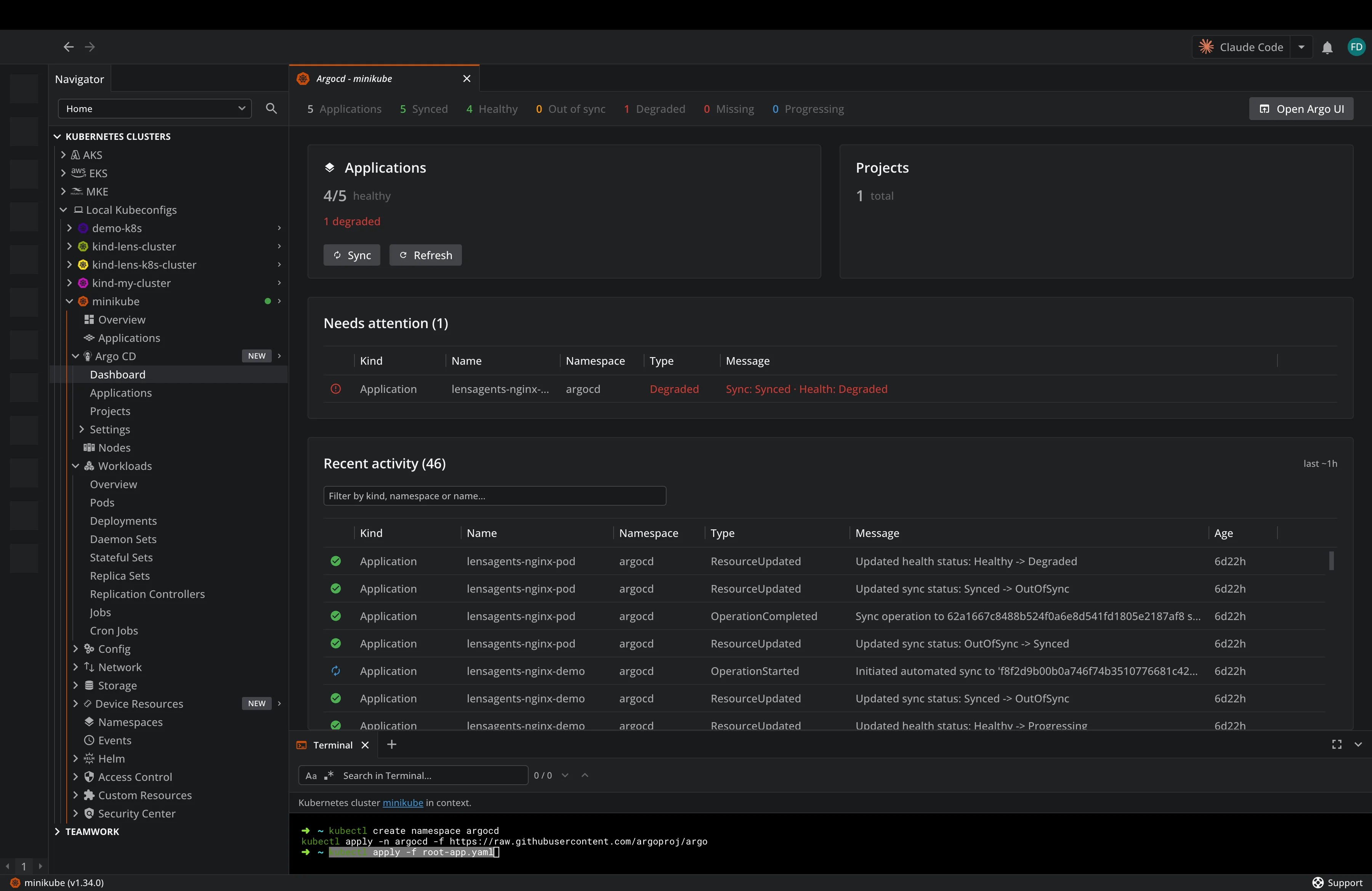
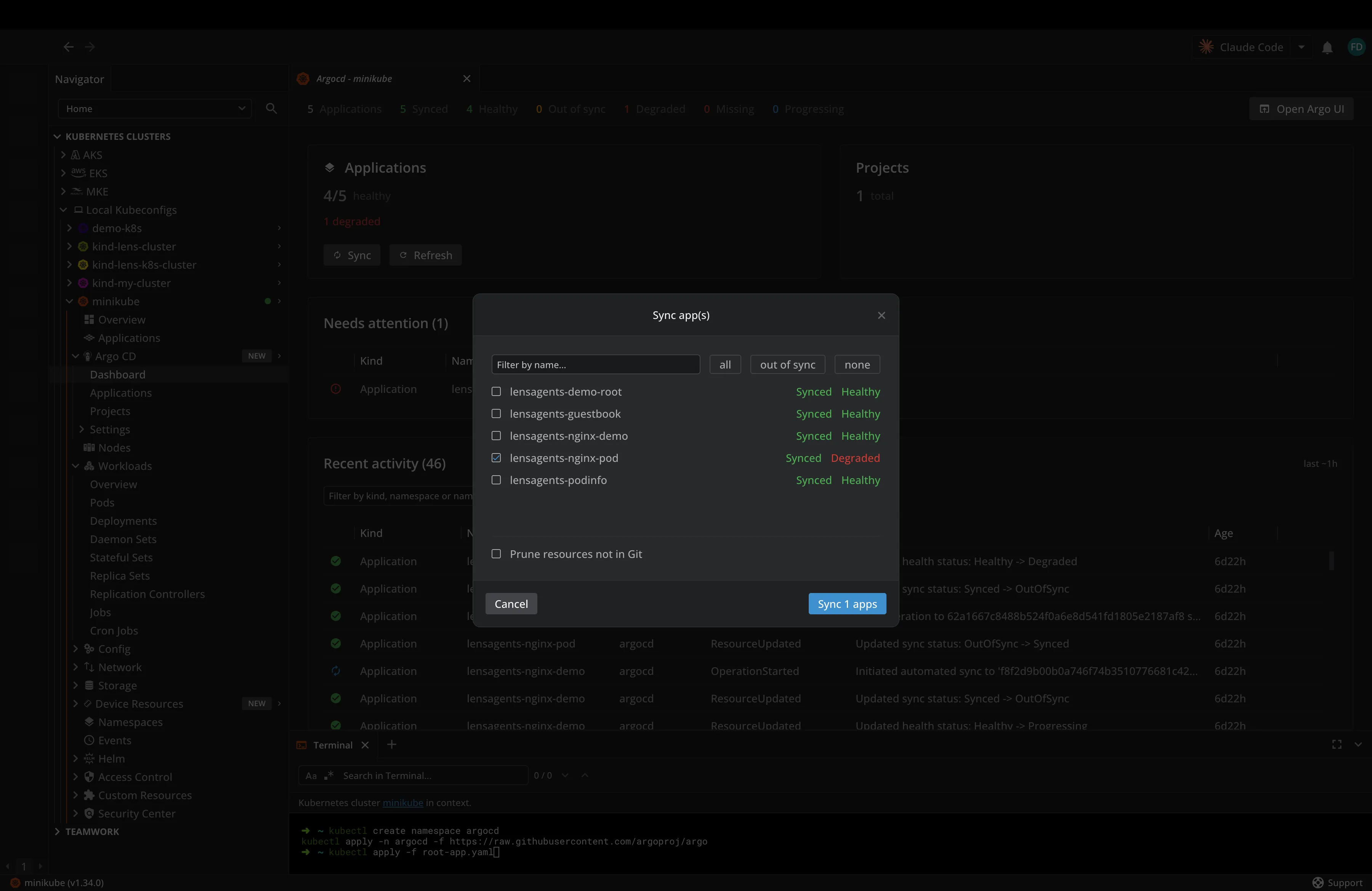
Now, if we go to GitHub and fix the error, in a couple of seconds Argo CD will pick it up, and it will sync it to the cluster. If you are impatient, you can actually do the sync manually as well, by clicking the Sync button under the applications inside the dashboard:
How to log in to the Argo CD dashboard?
If you are using Lens Kubernetes IDE, you can easily log in to the Argo CD dashboard by clicking the Open Argo UI button. The username is admin, and you will need to get the password from a Kubernetes secret.
In Lens K8S IDE, this is straightforward; you just head out to Config -> Secrets -> (add a filter on the argocd namespace) -> click on the argocd-initial-admin-secret. In the end, you simply toggle a button to get the base64-decoded value of the password, and you can easily use that:
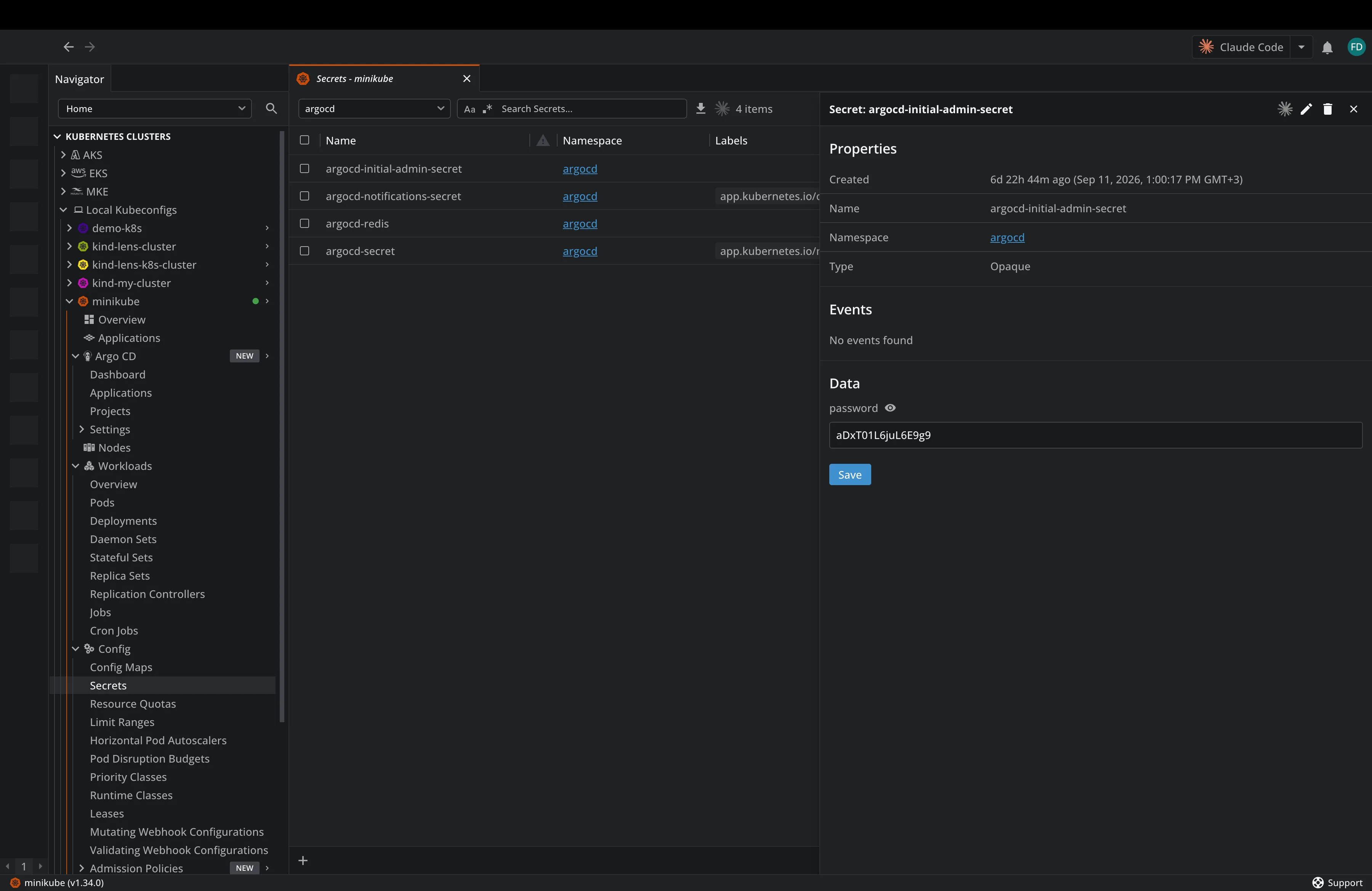
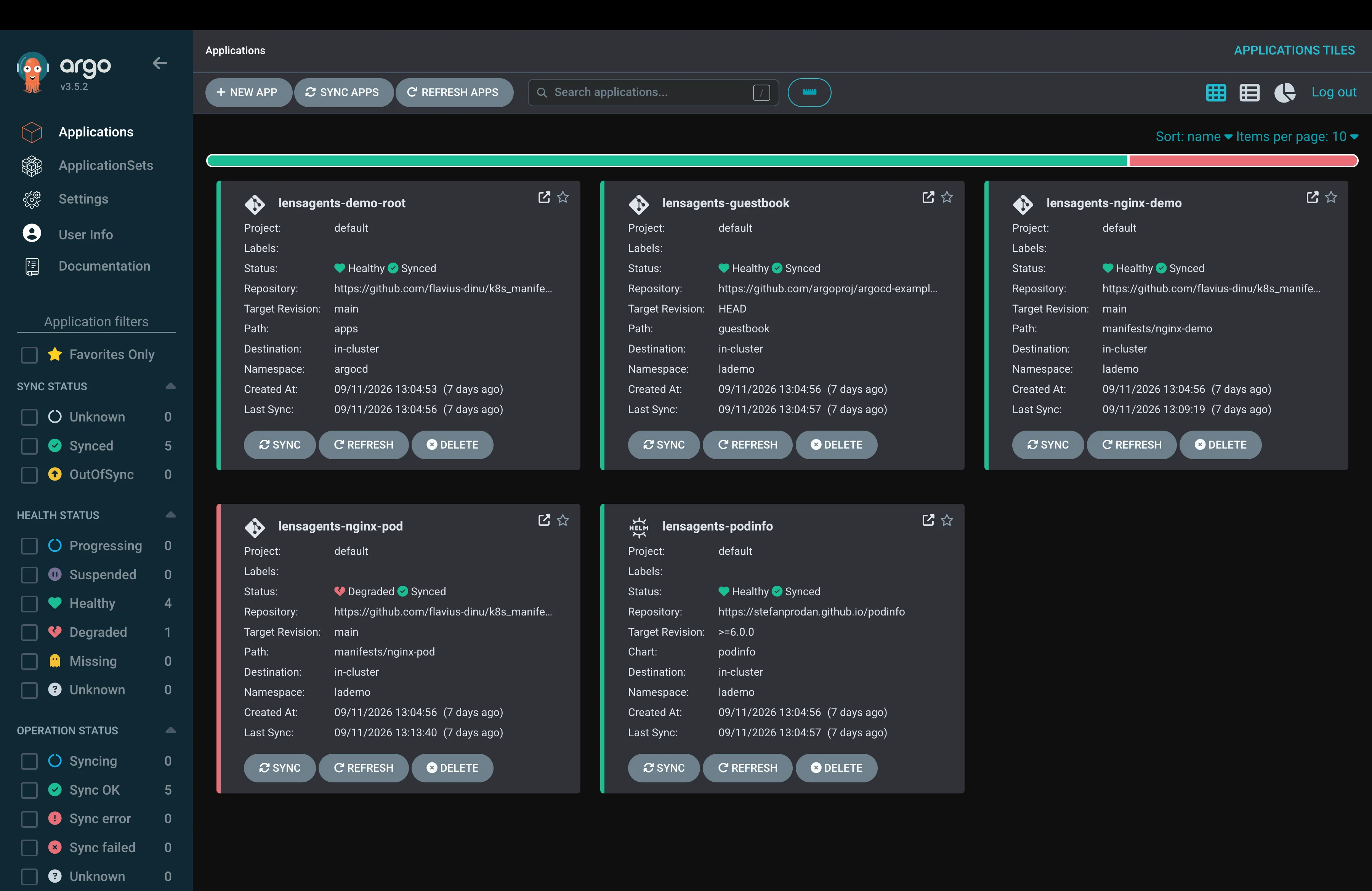
Now, if we head over to the Argo CD UI, we can log in with these credentials and see all of our applications there as well:
How to scale up with ApplicationSets?
The app of apps pattern solves bootstrapping, but the biggest problem with it is the fact that you need to write a separate Application manifest for every new application. For a couple of applications, this is perfectly fine, but if you think that you might need to create 50 similar applications across several environments, you will end up repeating the same repository, destination, and sync policy over and over again, with only a couple of values changing.
This is where an ApplicationSet is a better fit: it takes a template and a source of parameters, then generates the applications automatically. A common setup is a generator that walks the directories of your repository and creates one application per directory it finds.
Each matching directory will supply a name and a path, and the template supplies the common configuration. This means that if you add a new workload directory, Argo CD will be able to generate its application without needing to copy another YAML file. Whether the workload deploys immediately depends on the generated application's sync policy.
The app of apps pattern will be useful for bootstrapping, and a root application can even deploy an ApplicationSet, but when you repeat the same application structure over and over, ApplicationSets remove a lot of that maintenance.
What are the best practices for Argo CD in production?
When it comes to using Argo CD in production, there are three things you need to consider:
- Turn off the admin account: You should never use the admin account after you've started setting up Argo CD, because this will be a great security risk for your production environment. What you can do is wire up SSO through your identity provider, and use a project with role-based access control (RBAC) to scope exactly what each team can deploy and where
- Split your repositories: Keep application source code and deployments in separate repos, because if they live together, your CI pipeline will commit a new image tag, which will trigger CI again, which in some cases might commit again, making you end up in a loop
- Handle secrets properly: You can take advantage of SealedSecrets, or better yet, the External Secrets Operator pulling from HashiCorp Vault, AWS Secrets Manager, or OpenBao
Key takeaways
Argo CD turns Git into the single source of truth for your cluster, enabling drift detection, a full audit trail, and deployments that don't require handing out cluster credentials.
Start by learning the fundamentals, then take one of your real applications running in Kubernetes, move its manifests into a repository, and point a single application to it with auto-sync off. If you want to compare Argo CD with the other big GitOps option, we covered both in implementing GitOps with Argo CD and Flux.
Lens Kubernetes IDE will help you manage your Argo CD workflows with ease, giving you the visibility you need to understand their sync and health status at a glance. If you want to see how Lens K8S IDE helps with your Kubernetes clusters and Argo CD, book a demo with one of our engineers.
FAQ
What is Argo CD used for?
Argo CD is used for continuous delivery of your applications to Kubernetes using GitOps. You simply declare the desired state of your applications in Git, and Argo CD keeps your cluster in sync with it. You get drift detection out of the box, plus an audit trail for every change.
Is Argo CD free?
Yes, Argo CD is open source under the Apache 2.0 license, and it is a CNCF graduated project. You can run it in any Kubernetes cluster without any licensing costs, but there are several vendors that also offer managed or enterprise versions as well.
What is the difference between sync and health in Argo CD?
Sync checks if Git definitions match your Kubernetes cluster, while health checks if the application manifests are working properly.
Does Argo CD replace my CI pipeline?
No, Argo CD handles the delivery side, but your CI pipeline still builds, tests, and pushes your container images.
How does Lens Kubernetes IDE help with Argo CD?
Lens Kubernetes IDE automatically detects the Argo CRDs as soon as they are available in the cluster. From there, you get a dashboard that shows you how many applications are synced, healthy, out of sync, progressing, degraded, or missing, along with a "Needs attention" panel that lists problematic applications and the real reason behind each one. You can trigger sync and refresh actions, and even see a timeline of all the events that have happened to your Argo CD applications.