
TL;DR
- In the Code tab of Claude Desktop, anyone can give Claude a task that takes real work: research a market, clean up a spreadsheet, write a report, fix a bug. In a cloud session, the task continues when you close the laptop.
- By default, that work runs on Anthropic's machines. With self-hosted environments, it runs on a machine that your company operates. But that machine runs commands that a model writes, and the docs leave its hardening to you.
- A Lens Agents sandbox gives you that hardening in one spec file: no open port, rules for what the task can reach, and a record of every request. Share the sandboxes in a team, or give each person their own.
Claude Desktop is not only for developers. A researcher asks Claude to collect sources and compare them. A marketer asks for a competitor summary or a cleaned-up campaign report. In the Code tab, Claude does that work with a real computer: it runs commands, reads the web, and writes files.
Where that computer is matters. On your laptop, the task stops when you close it, and it can read everything that you can. In a cloud session, the task runs on Anthropic's machines, and your company has no say in what it can reach.
Self-hosted environments put that computer in your company. Claude Desktop stays the same for the user, and the work runs on a machine that your platform team operates. That machine then runs commands that a model writes. The Claude Code docs say what it needs: a dedicated host, no broad credentials, and default-deny egress. They also say that the product can't enforce the egress part for you.
A Lens Agents sandbox has all three from the start. This post makes one an environment that people can pick in Claude Desktop.
How the pieces fit
A self-hosted environment has three parts:
- The environment is a name in your claude.ai organization. It shows in the environment selector of Claude Desktop, next to the environments that Anthropic hosts.
- The runner is a process on your machine. It is part of the Claude Code CLI,
claude. It registers with the environment, waits for work, and starts one Claude Code process for each task. - The session is one task. The user starts it and talks to it in Claude Desktop, as before.
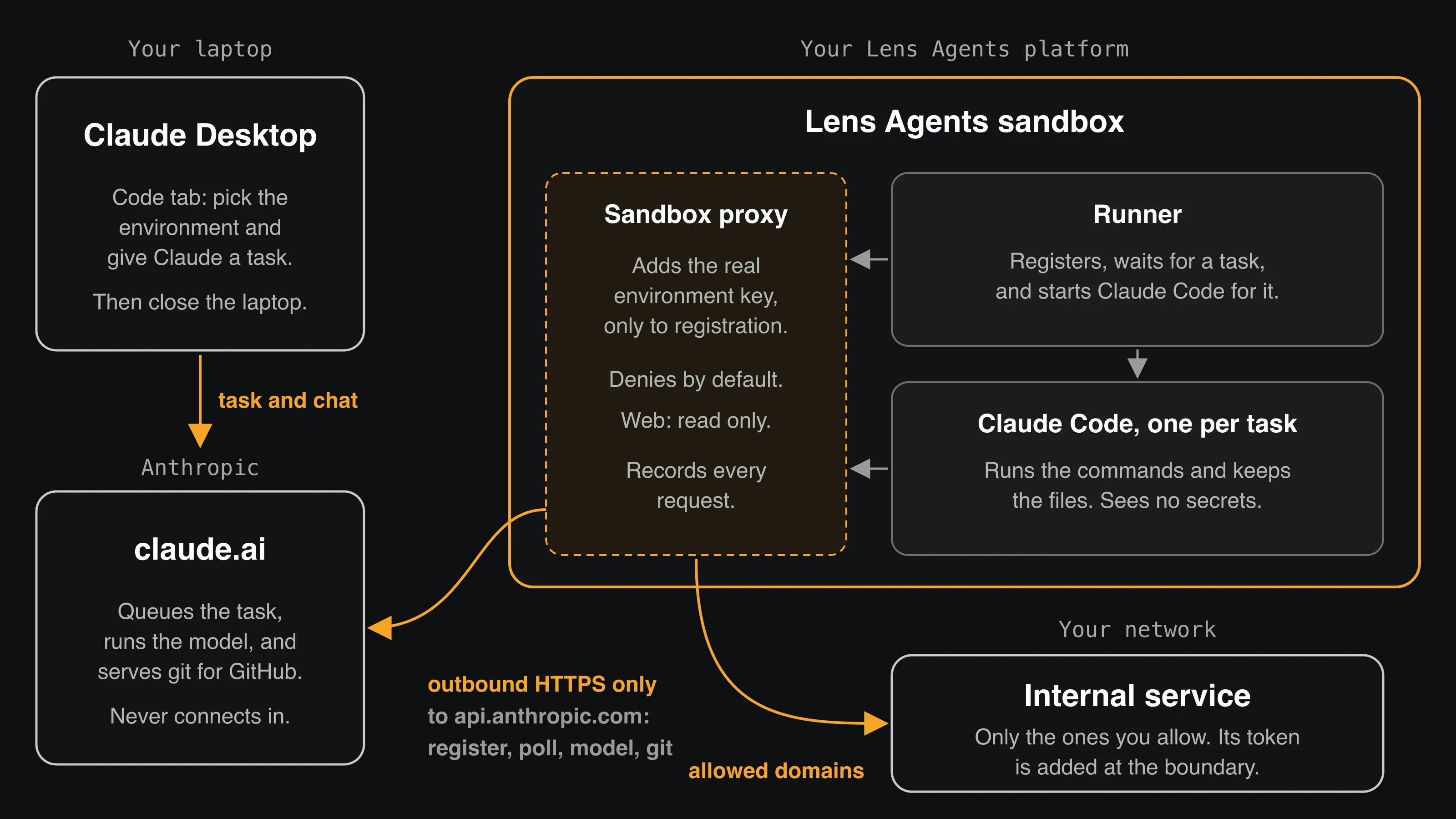
The runner only makes outbound HTTPS requests to api.anthropic.com. Anthropic never connects to it, so the sandbox needs no exposed port. The prompts and the model answers go through Anthropic. The commands, the downloads, and the files that the task makes stay in the sandbox.
The runner proves that it belongs to the environment with an environment key. The key never enters the sandbox: the sandbox holds a placeholder, and Lens Agents adds the real key at the boundary, only to the request that registers the runner. Each task then uses its own token from Anthropic.
Some tasks also work on a GitHub repository. For those, the runner asks Anthropic for git access to github.com, and Anthropic uses the GitHub connection of the person who started the task. The sandbox holds no GitHub credential.
Shared or dedicated runners
An environment can have many runners, and any member of your claude.ai organization can send a task to any environment. You choose who the runners in it serve:
- Shared runners take the tasks of anyone in the organization. A runner serves one person at a time, but the next task can be from another person. A team shares a few sandboxes, and you add sandboxes when more tasks must run at the same time.
- Dedicated runners take the tasks of one person only. Each person gets their own sandbox, and all the files in it belong to that person.
Shared runners are the easier start. Use dedicated runners when tasks handle data that other people must not see. The Claude Code docs explain why: when a runner starts again on the same machine, the files of the last task can still be there.
The same spec does both. Don't mix the two in one environment, because a shared runner also takes the tasks of a person who has a dedicated runner. If you use both, create one environment for each.
Who does what
Steps 1 to 3 are for the person who runs your Lens Agents platform. They do Steps 1 and 2 once, and Step 3 once for each sandbox. Step 4 is for the person who uses Claude Desktop, and it is the only step that they see.
The platform admin needs:
- A Claude Team or Enterprise plan. Self-hosted environments are a public beta. An Owner must turn on Allow self-hosted environments on the Cloud environments admin page.
- A Lens Agents platform. If you don't have one yet, follow the getting started guide.
nexusctl, installed from your Lens Agents platform and logged in withnexusctl auth login.
The user needs Claude Desktop, signed in to the same claude.ai organization. For tasks on a GitHub repository, they also need a GitHub connection on their claude.ai account, and an Owner must enable the GitHub connector.
Step 1: Create the environment
On the Cloud environments page, under Self-hosted environments, select New. Give the environment a name that tells people what it is, such as lens-agents-shared or lens-agents-dedicated, and select Create. Then select Copy environment key.
The key is shown only once. Keep it in a password manager: you need it in Step 3 for each sandbox. It expires 365 days after you create it.
Step 2: Define the sandbox
name: Claude Runner
image: ubuntu:24.04
command: sh /home/ubuntu/run-runner.sh
cpu: "4"
memory: 8Gi

user: ubuntu
workdir: /home/ubuntu

volumes:
  - mountPath: /home/ubuntu
    size: 30Gi

env:
  CLAUDE_CODE_VERSION: "2.1.311"
  CLAUDE_ACCOUNT: "${CLAUDE_ACCOUNT}"

files:
  - path: /home/ubuntu/run-runner.sh
    content: |
      delay=5
      while :; do
        rm -rf "$HOME/workspace"
        set -- --base-dir "$HOME/workspace" \
          --use-anthropic-git-proxy
        [ -z "$CLAUDE_ACCOUNT" ] || set -- "$@" --lock-to-account "$CLAUDE_ACCOUNT"

        started=$(date +%s)
        claude self-hosted-runner "$@"
        if [ $(( $(date +%s) - started )) -ge 60 ]; then delay=5
        else delay=$(( delay * 2 > 300 ? 300 : delay * 2 )); fi
        sleep "$delay"
      done

scripts:
  - when: pre-start
    description: install base packages
    user: root
    run: |
      apt-get update -qq
      DEBIAN_FRONTEND=noninteractive apt-get install -y -qq --no-install-recommends \
        curl git ca-certificates openssh-client jq python3 >/dev/null
  - when: pre-start
    description: give the home volume to the runner user
    user: root
    run: chown ubuntu:ubuntu /home/ubuntu
  - when: pre-start
    description: install Claude Code
    user: root
    run: |
      bin=/home/ubuntu/.local/share/claude/claude-$CLAUDE_CODE_VERSION
      if [ ! -x "$bin" ]; then
        mkdir -p "$(dirname "$bin")"
        curl -fsSL -o "$bin.tmp" \
          "https://downloads.claude.ai/claude-code-releases/$CLAUDE_CODE_VERSION/linux-x64/claude"
        chmod +x "$bin.tmp" && mv "$bin.tmp" "$bin"
        chown -R ubuntu:ubuntu /home/ubuntu/.local
      fi
      ln -sf "$bin" /usr/local/bin/claude

policy:
  name: Claude Runner
  networkDefaultVerdict: deny
  allowedDomains:
    - { pattern: api.anthropic.com, verdict: allow, transport: direct }
    - { pattern: "*.internal.example.com", verdict: deny, transport: direct }
    - { pattern: "10.0.0.0/8", verdict: deny, transport: direct }
    - { pattern: "172.16.0.0/12", verdict: deny, transport: direct }
    - { pattern: "192.168.0.0/16", verdict: deny, transport: direct }
    - pattern: "*"
      verdict: allow
      transport: direct
      description: Read-only internet
      rules:
        - { method: GET }
        - { method: HEAD }
  credentials:
    - { credentialName: environment-key, envVarKey: SELF_HOSTED_RUNNER_ENVIRONMENT_SECRET }

credentials:
  environment-key:
    value: ${ENVIRONMENT_KEY}
    injections:
      - domain: api.anthropic.com
        headerName: Authorization
        headerFormat: "Bearer {value}"
        rules:
          - { method: POST, path: /v1/code/runners/self-hosted/runners/register }
A few things to note:
- The environment key is a credential.
$SELF_HOSTED_RUNNER_ENVIRONMENT_SECRETin the sandbox holds a placeholder, and the runner sends it as is. The injection rule adds the real key only toPOST /v1/code/runners/self-hosted/runners/register. After that, the runner uses a token that the registration returns, and each task uses its own token, so the injection doesn't touch them. - The runner exits after each task. That is by design: one runner serves one session. The start script starts it again. If the runner fails soon after it starts, the script waits longer each time, up to five minutes, as the Claude Code docs recommend.
CLAUDE_ACCOUNTselects the option. Set it to an email address, and the script adds--lock-to-account, so the runner takes only the tasks of that person. Leave it empty, and the runner is shared.- Each task starts in an empty workspace. Before the runner starts, the script deletes
~/workspace, where the runner clones repositories and keeps the files of each task. Files that a task writes in other places, such as caches in the home directory, stay on the volume. With shared runners, the next person's task can read them, so use dedicated runners for sensitive data. --use-anthropic-git-proxygives tasks git access togithub.comthroughapi.anthropic.com. It works only for repositories ongithub.com, and only for branch pushes. A push of a tag or a branch delete fails.- The task can read the web, but not write to it. The policy denies by default. For the internet, only
GETandHEADpass, so Claude can read pages and download files, but it can't post a form or upload a file. The one exception isapi.anthropic.com, which carries the model and the git pushes. If a task needs to write to a service, add that domain with the methods it needs. - Internal services are your choice. The read-only rule for
*also matches internal hosts and IP addresses that your Lens Agents platform can reach, and the first rule that matches wins. So the spec denies your internal domains and the private IPv4 ranges first. Replace*.internal.example.comwith your internal domains. The pattern also coversinternal.example.comitself. Add any other range that your network uses, such as100.64.0.0/10. The IP ranges stop requests to an address, but not to a name: a name outside your list that points to an internal address still passes. To let tasks use an internal service, such as a reporting API, add a rule for its domain above the deny rules. If the service needs a token, add it as a credential with an injection for that domain, as for the environment key. The task then uses the service, but never sees the token. - Claude Code is pinned.
CLAUDE_CODE_VERSIONsets the version, and the binary is stored on the volume, so a restart doesn't download it again. The runner needs 2.1.224 or later, and the git proxy needs 2.1.267 or later. To upgrade, change the version and runnexusctl sandbox update <sandbox> --project <org>/<project> -f sandbox.yaml, withENVIRONMENT_KEYandCLAUDE_ACCOUNTset as in Step 3. - The model comes from Anthropic. The session uses a token that Anthropic issues for it, so it can't use Lens Agents managed inference. Your claude.ai plan pays for the model.
Step 3: Create the sandbox
Read the environment key into your shell first:
read -rs ENVIRONMENT_KEY && export ENVIRONMENT_KEYPaste the key at the prompt. read -s keeps it off the screen and out of your shell history. Use the key of the environment for this option.
For a shared runner, leave CLAUDE_ACCOUNT empty. Run the command again for each sandbox that you want in the team:
CLAUDE_ACCOUNT= nexusctl sandbox create --project <org>/<project> -f sandbox.yamlFor a dedicated runner, use the email address that the person uses for claude.ai:
CLAUDE_ACCOUNT=person@example.com nexusctl sandbox create --project <org>/<project> -f sandbox.yamlcreate expands ${ENVIRONMENT_KEY} and ${CLAUDE_ACCOUNT} from your environment. The first start installs packages and downloads Claude Code, so it takes a minute or two. Then the runner registers:
nexusctl sandbox logs <sandbox> --project <org>/<project>[self-hosted-runner] Registering as opted in to Anthropic-managed git (--use-anthropic-git-proxy)
[self-hosted-runner] Registered: runner_id=<runner-id>On the Cloud environments page, the environment changes from No runners deployed to Healthy.
Step 4: Start a task
This step is for the person who uses Claude Desktop.
Open the Code tab and start a new session. In the row under the prompt box, the first control is the environment selector. Select the environment there, such as lens-agents-shared. If the task works on a GitHub repository, select it too. Then ask Claude for what you need, for example:
Find the five most-cited papers on retrieval-augmented generation from the last two years. Summarize each one in three sentences, and write a comparison table to a Markdown file.Claude works in the sandbox: it reads the web, runs commands, and writes files. You can close the laptop. The task continues in the sandbox, and you can follow it in the Claude mobile app or on claude.ai/code.
When the task ends, the runner exits, the script starts a new one, and the environment is ready for the next task.
What the sandbox adds
Claude Desktop gives people the interface. The sandbox decides what their tasks can do:
- A computer off the laptop. The task can't read the files, passwords, or cloud logins on the laptop. With dedicated runners, each person's tasks also run in their own sandbox.
- No open port. The runner only connects out. Nobody can reach it from the internet.
- Read-only web, by default. Only
api.anthropic.comgets writes. Rules for each domain and each method, enforced outside the task. The Claude Code docs recommend default-deny egress for self-hosted runners, and they leave it to you. Here, it is part of the spec. - No secrets in the sandbox. The environment key is added at the boundary, and Anthropic-managed git uses the GitHub connection of the person on claude.ai. A task can't read the key or send it anywhere. It can only use it to register a runner, as the runner does.
- Audit. Every request the sandbox proxy handles is recorded, with the policy decision. When someone asks what a task did on the network, you have the answer.
The workspace is deleted before each task, so ask Claude to put results that you want to keep where you can get them, such as a GitHub repository.
If you are a developer and you prefer to work in your editor, see how to use VS Code and Claude Code on a Lens Agents sandbox.
Run your agents governed
Run Claude, Codex and other agents with identity, policy, and audit built in.
FAQ
Do people need to know the command line or Git?
No. They use Claude Desktop as before and select the environment. The platform admin does the setup.
Does this work for normal chats and Cowork in Claude Desktop?
No. Self-hosted environments are for the Code tab only. Normal chats and Cowork run as before.
How do I add a person?
With shared runners, you don't: anyone in the organization can use them. With dedicated runners, create a sandbox for the person from the same spec, with their email in CLAUDE_ACCOUNT, and give it the key of the dedicated environment.
What happens if a person without a sandbox picks the dedicated environment?
No runner is locked to them, so no runner takes their task. Create a sandbox for them first, or tell them to use the shared environment.
How many tasks can run at the same time?
One for each runner: the git proxy needs one task for each runner. With shared runners, add sandboxes to the team. With dedicated runners, create a second sandbox for the person.
Does the sandbox need an exposed port?
No. The runner only makes outbound HTTPS requests to api.anthropic.com. Anthropic never connects to the sandbox.
How do I rotate the environment key?
Create a new key on the environment's Configuration tab. For each sandbox of that environment, read the new key as in Step 3 and run nexusctl sandbox update <sandbox> --project <org>/<project> -f sandbox.yaml, with the same CLAUDE_ACCOUNT as before. The runner gets the new key the next time it registers, after the current task. When all sandboxes have the new key, revoke the old key.